Compute billed for peak capacity
Warehouses and always-on compute are sized for month-end, then billed by the hour or the credit, busy or idle.
Wekalp: compute is used only while a job runs. No idle compute, no credits.
Every query, from an analyst, an AI conversation or an API, and every orchestrated run uses the same in-process engines — DuckDB, Apache Arrow and Polars or pandas — reading Parquet where it sits. Every job runs under a memory limit and gives it all back when it finishes. Results are written back as new, versioned tables. No idle capacity to pay for, and no separate database to keep in sync.
Nothing to keep warm or pay for while no job is running.
Validated and written back, on 7 vCPU and 18 GiB, in production.
Released when the job ends, so leaked memory never builds up.
Full SQL runs directly on the governed Parquet files.
Most data compute is either a warehouse billed for its peak or Python scripts that leak memory and leave no record, with SQL, Python, schedules and spreadsheet formulas spread across both. It fails in four ways.
Warehouses and always-on compute are sized for month-end, then billed by the hour or the credit, busy or idle.
A long-running pandas process copies frames and rarely hands memory back. The job that ran fine on Monday is killed on Friday.
Chat and copilot tools are often connected straight to tables, so what the model can see depends on how it was set up.
Someone has to dig through logs to find the cause, rebuild the inputs and re-run by hand, and the old output is often overwritten.
Compute does two jobs. Querying answers a request for data, from a technical user, an analyst, a business user in conversation or another system. Orchestration runs automated batches that build downstream tables, visuals and reports. Both use the same engine. Orchestration adds a layer of control and governance on top, and the Command Center puts that control in people's hands.
A dashboard click, an API call, an AI agent's question and a nightly batch all take the same route. Compute sits between a governed compiler and versioned storage, and holds nothing between jobs.
People, apps, AI agents and the scheduler all use the same entry point.
The versioned definition, its parameters and the asker's row filter become one SQL plan.
A query goes straight to the engine; an orchestrated run is decided, planned and ordered first (Part 3).
The file sweep feeds DuckDB, which hands data to Polars or pandas through Arrow.
Results land as new versions with the same Delta Lake-style ACID guarantees as the storage layer. Earlier versions stay readable.
New Parquet files appear in your object store in one ledger commit. Storage Architecture →
No single engine is best at everything. DuckDB does the relational work, Polars or pandas run the Python logic on a small, pruned frame, and Apache Arrow hands data between them without copying it.
Open-source editions throughout: DuckDB and Polars (MIT), pandas (BSD-3), Apache Arrow (Apache 2.0).
Every read is cut down in four steps before any processing starts: files, then versions and dates, then columns, then rows. Everything else stays in storage. In our own platform, scanning in DuckDB before pandas cut memory on large operations by 80–90% (The Kitchen Revolution).
The ledger identifies the files a query, process or run needs. No other file is opened.
Within those files, only the specific versions and business dates the run needs are read.
Only the columns the query or process uses are read and handed on.
Filters are applied as the data is read, and row groups that cannot match are skipped.
The records a run needs often sit across several current files. Building one merged file from them is expensive, so in most runs no merged file is created: DuckDB queries the current parts directly and unions the results. A merged file is built only when an execution or assertion has to see every record in one place.
Spreadsheet logic is translated into versioned rules, then run as SQL in DuckDB or as Python in Polars. Each rule is tested in a sandbox before it touches live data, and can be read back as spreadsheet logic.
=VLOOKUP(C2, Branch_Master!A:D, 4, FALSE)R-114 v3
Loans.region ← BranchMaster.region
key: branch_code
match: exact
no match: flag, do not guessSELECT l.*, b.region,
b.branch_code IS NULL AS r114_no_match
FROM loans l
LEFT JOIN branch_master b
ON l.branch_code = b.branch_codeloans.join(
branch_master.select("branch_code", "region"),
on="branch_code", how="left",
).with_columns(
pl.col("region").is_null().alias("r114_no_match")
)A missing branch becomes a logged validation result, not a silent #N/A, and a duplicate key in the master is flagged instead of Excel quietly taking the first row.
=VLOOKUP(G2, Rate_Bands!A:B, 2, TRUE)R-207 v1
Loans.rate_band ← RateBands.band
range: balance ≥ lower_bound
match: nearest lower bandSELECT l.*, r.band
FROM loans l
ASOF LEFT JOIN rate_bands r
ON l.balance >= r.lower_boundloans.sort("balance").join_asof(
rate_bands.sort("lower_bound"),
left_on="balance", right_on="lower_bound",
)A lookup that silently depends on the sheet being sorted becomes an explicit range rule.
=SUMIFS(Loans!K:K, Loans!C:C, A2, Loans!H:H, "Active")R-031 v5
Branch.active_balance = SUM(Loans.outstanding_balance)
group: branch_code
filter: status = 'Active'SELECT branch_code,
SUM(outstanding_balance) AS active_balance
FROM loans
WHERE status = 'Active'
GROUP BY branch_codeloans.filter(pl.col("status") == "Active")
.group_by("branch_code")
.agg(pl.col("outstanding_balance").sum()
.alias("active_balance"))One rule replaces a formula copied down thousands of rows, and runs on every branch at once.
Data moves from source tables to worktables to business tables, with SQL views for anything a data team prefers to write as a query. All of it is Parquet in the same versioned storage, so there is no separate serving database to license, size or secure.
Nothing is changed on the way in. The type of source decides how each new load is treated.
Each load is added to the ones before it: payments, journals, trades.
Each load replaces that date's picture, and can carry forward: balances, inventory.
Each load is the current list, and the latest version is used: customers, products.
Rows carry start and end dates, so you can ask what was true on any date.
Every kind is versioned by business date, quality-checked and read through the same access rules.
The working tabs teams built in Excel, learned once and rebuilt every run, with audited adjustments.
Sources and worktables flattened into one wide, query-ready table, with a glossary for AI.
Tables defined by a query, for exploring, tidying a source or building a business table.
Built once per date and kept, or run as a query when read. One setting, nothing else changes.
How versions, golden records and the medallion lifecycle work: Storage Architecture.
Data jobs usually run out of memory for one of two reasons: pandas makes copies as it works (its creator, Wes McKinney, recommends 10 times as much RAM as data), or a long-running Python process holds on to memory from earlier jobs. Wekalp handles memory the way databases do: keep the working set small, cap it, spill what does not fit to disk, and release everything when the job ends.
DuckDB filters rows and columns first, so pandas or Polars only receives the small result.
DuckDB, Arrow buffers and Python run inside a set memory limit, sized per job type.
Above the limit, DuckDB writes the overflow to a scratch disk, so a large file slows down instead of failing.
Memory and scratch files are released after every job, and each run's peak memory is logged.
A standard Kubernetes emptyDir of 10 GiB, private to the job's container, which runs non-root with a read-only file system.
Scratch files sit on encrypted disks and are deleted after each job. Where disk is not permitted, jobs run fully in memory instead.
Measured on a regulatory credit-data submission at a live customer. At each size, processing, validation and write-back of the results complete within 300 seconds. Memory grows by 2 GiB for every 75 million extra data points.
How it scales. A larger run gets more CPU and memory, as the chart shows, and spills to the scratch disk rather than failing if a file outgrows its limit. Heavily read tables are stored once per business date instead of recomputed, and compute on Kubernetes autoscales with the number of jobs and users.
This workload runs inside Wekalp Regulatory Reporting.
Whoever asks, the request takes the shared path: compiled from governed definitions with the asker's row-level rules, run on the files in place, and logged.
SQL on the files to build or update stored tables and materialized views.
Query any table, at any version or business date, without loading it anywhere.
Questions in plain language, answered as tables or charts. The model never sees the data.
Every table is available through a published API, on an API key basis, under the same access rules.
The SQL that runs the platform's own pipelines runs directly on the Parquet in storage. Nothing is imported into a database or warehouse first, and every query still goes through the same compiler, row-level rules and audit log.
Conversational analytics and visualization use the same query path as everything else. The model reasons over governed metadata to write the query; it is never given the data. The query then runs through the same compiler and access rules as a dashboard or an API call.
A router sends the question to the right agent, carrying who is asking.
Metric and entity definitions, relationships and the glossary. Never rows.
The compiler adds the row filter, so a prompt cannot widen what a role can see.
DuckDB runs the query in place; the answer comes back as a table or chart.
Automated batches build downstream data, visuals and reports on the shared engine. What orchestration adds is control and governance: the system decides when to run and what to rebuild, plans the order, logs every step and writes versioned results, and people can step in at any point. There is no separate workflow engine to license.
Before anything is calculated, the engine decides whether the run can start, works out what it needs, what can be reused and in what order to build the rest. That keeps large batch runs fast, within memory and fully traceable.
Intermediate tables can also be kept as stored tables when users need them for audit.
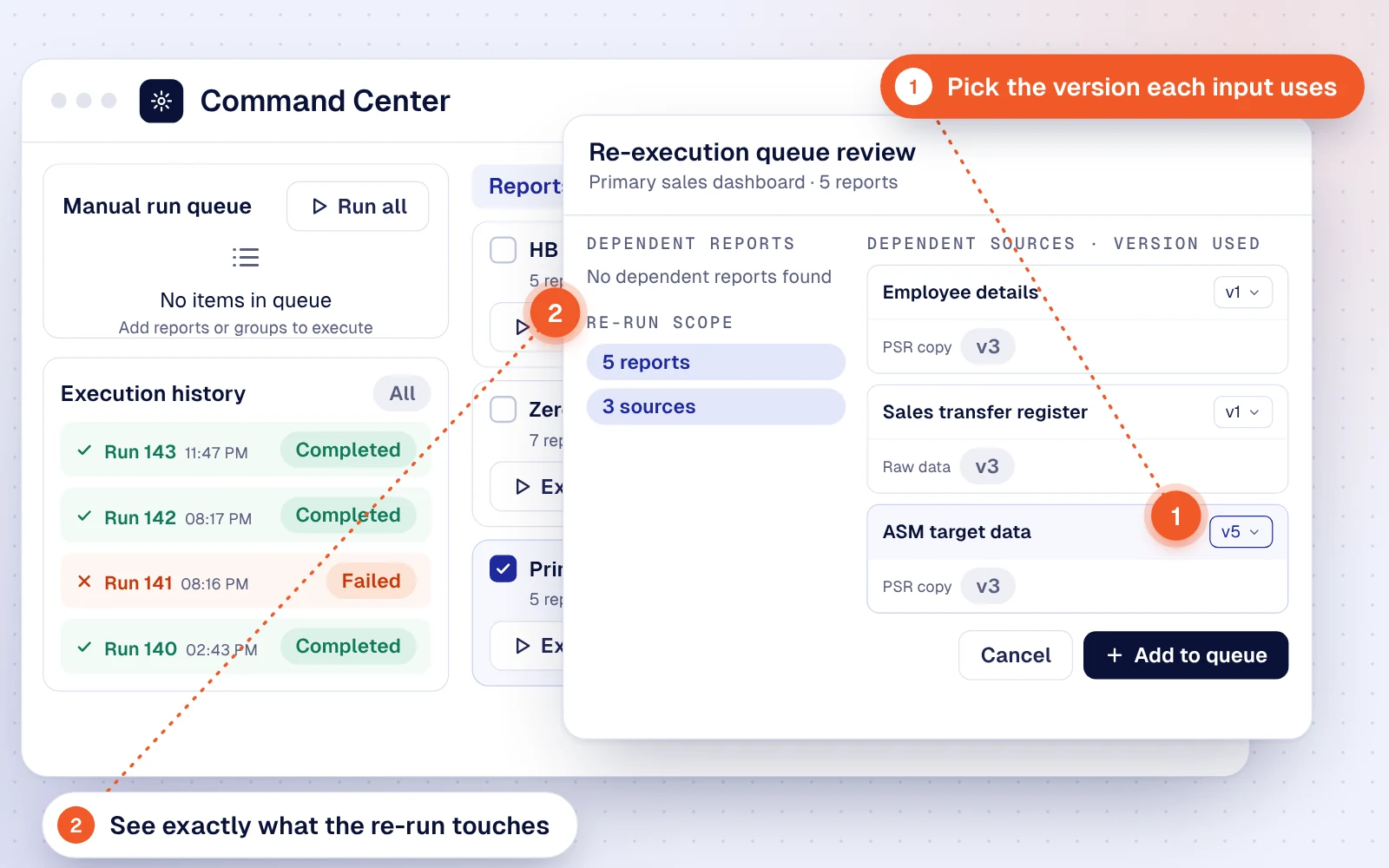
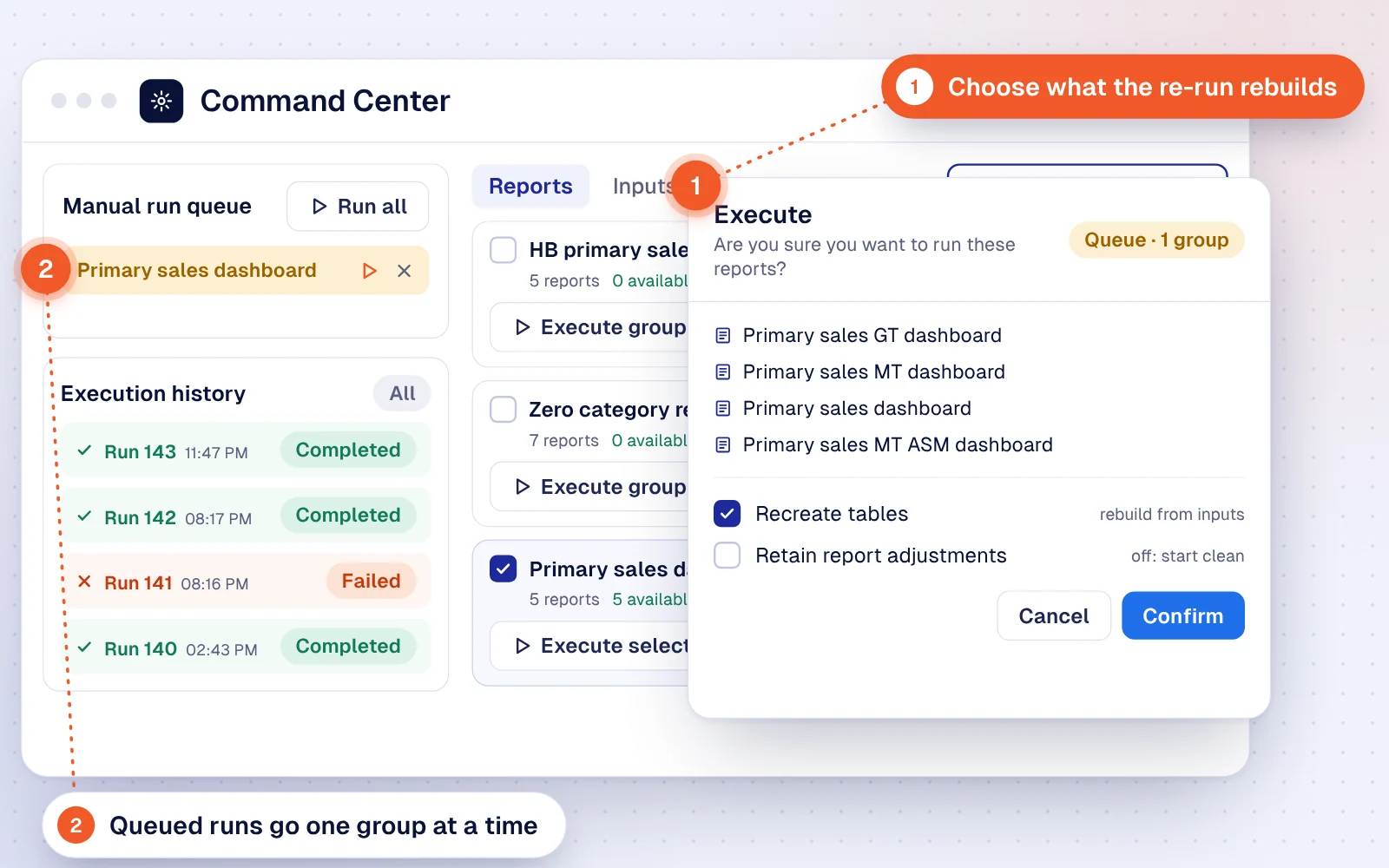
The Command Center is the interface for that control. Business owners run the whole show from one screen. Watch six moments, from spotting a failed run to re-running it with the inputs they choose.
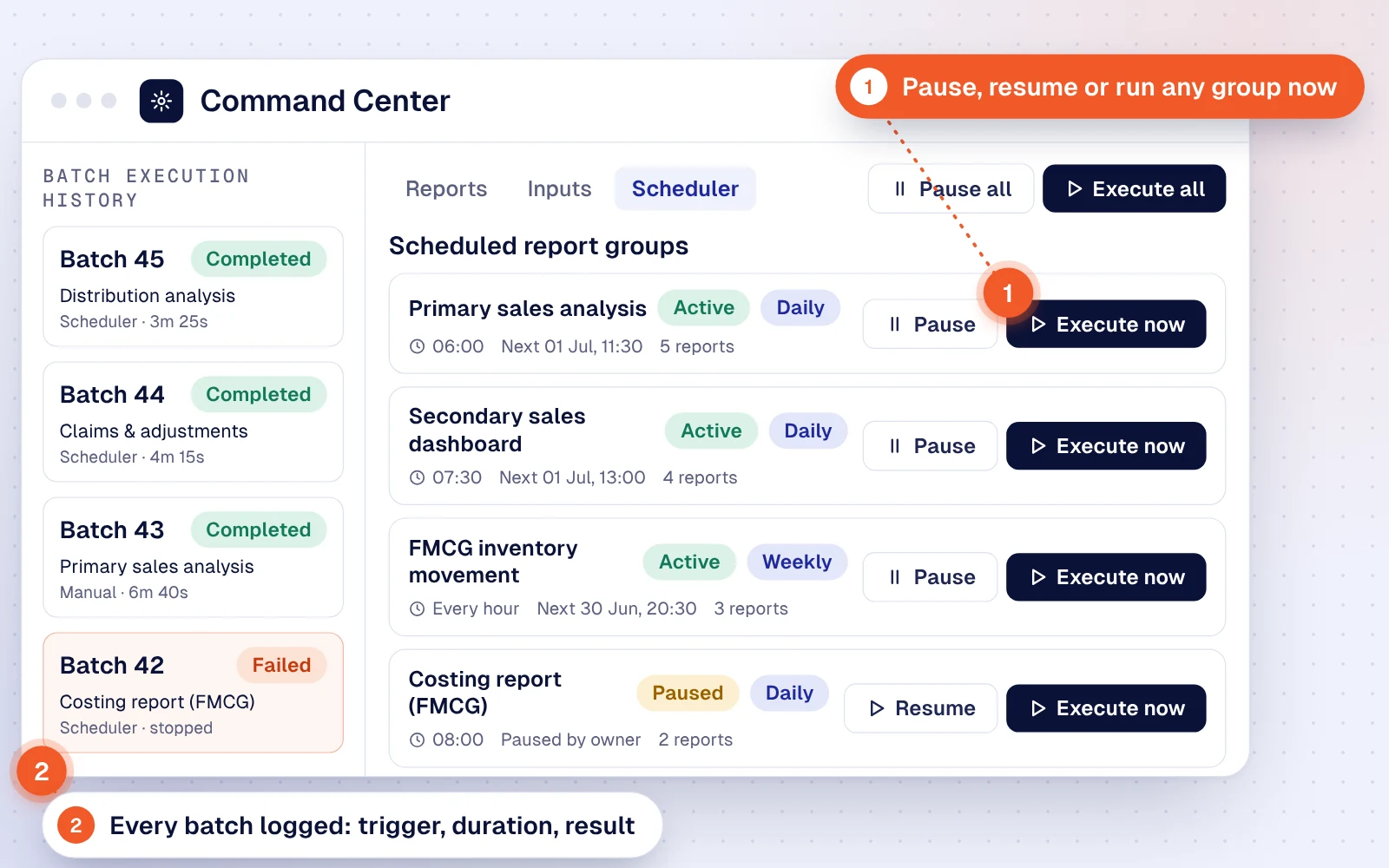
Scheduled report groups sit beside the batch history: what ran, what triggered it and how long it took.
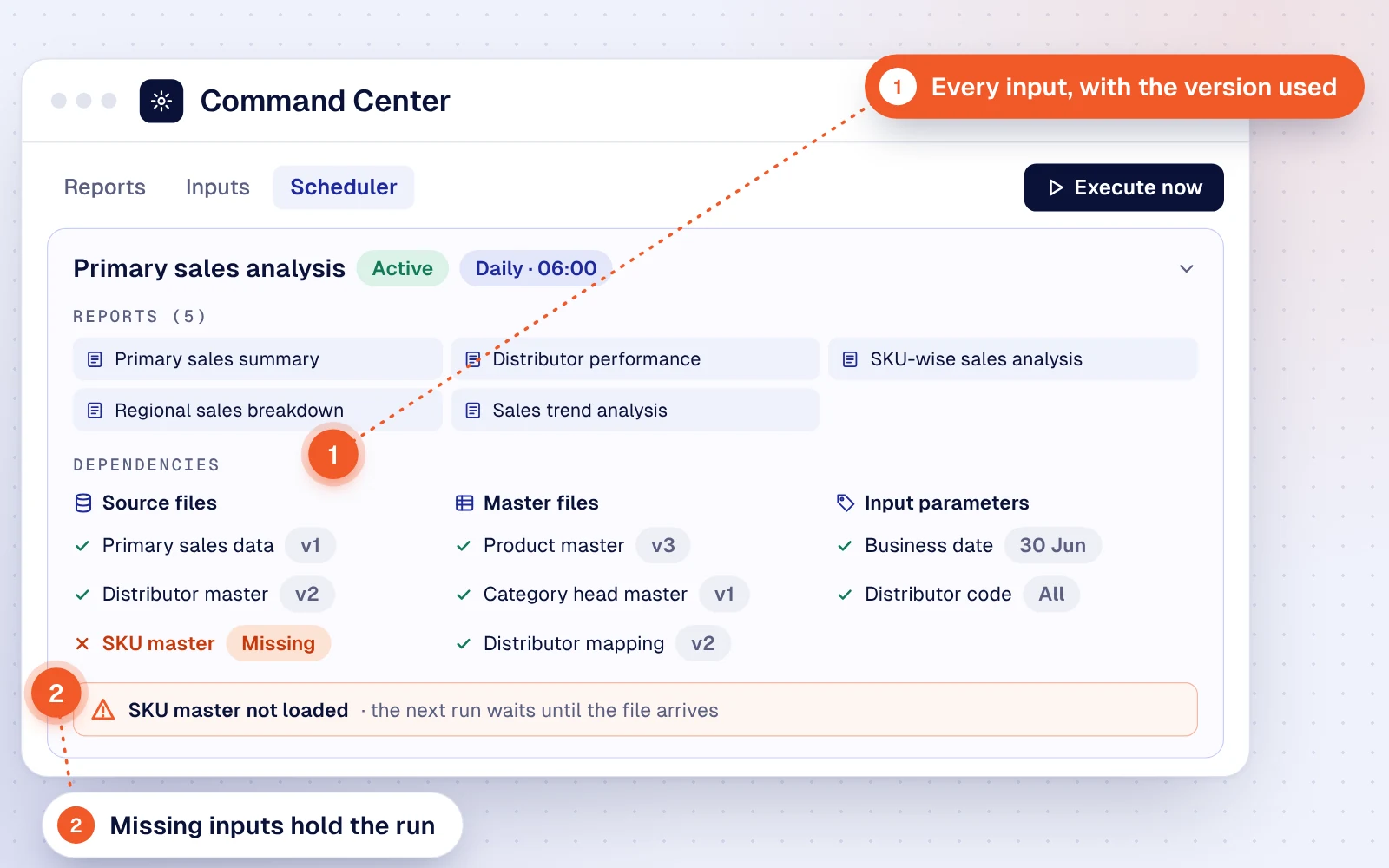
Open a group to see its reports and every source, master file and parameter, with the version each will use.
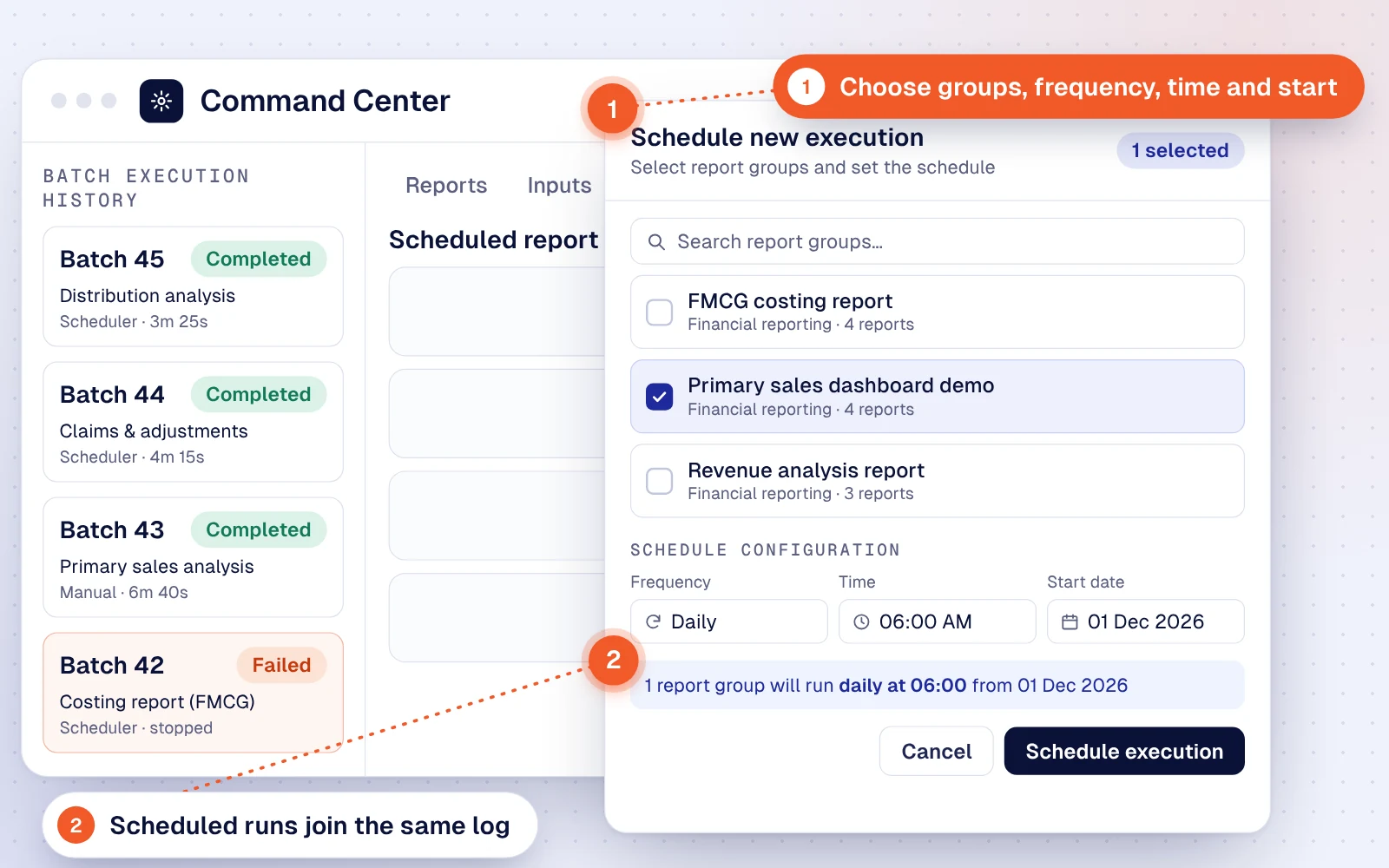
Pick report groups, then set the frequency, time and start date, or run a group straight away.
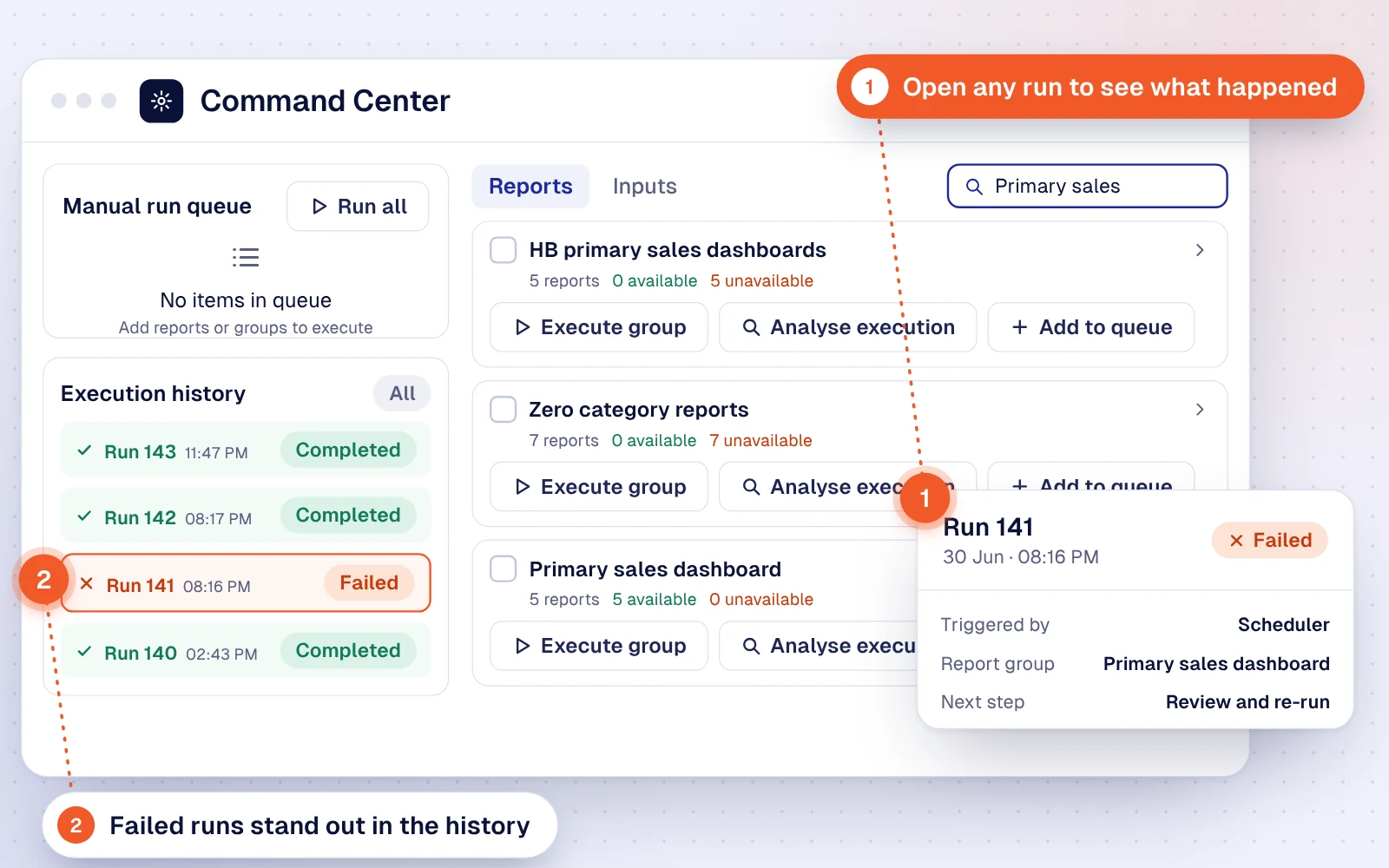
The execution history marks the failed run. Open it to see what triggered it and which group it belongs to.
The review lists dependent reports and sources, and lets you pick the version of each input the re-run reads.
Confirm the queued run and choose whether to rebuild tables and keep adjustments already posted.
Lakehouse platforms, warehouses and Python scripts each solve part of the problem. The table shows what each typically includes out of the box. These are general patterns, not a review of any one product; many platforms offer options that close some gaps.
| Capability | Wekalp | Lakehouse platform |
Cloud warehouse |
Python scripts |
|---|---|---|---|---|
| Cost | ||||
| Nothing billed while no job runs | ✓ | 1 | 1 | ✕ |
| No per-credit, per-scan or per-query metering | ✓ | ✕ | ✕ | ✓ |
| Execution | ||||
| SQL directly on open Parquet files | ✓ | ✓ | 2 | 3 |
| Python logic in the same governed path as SQL | ✓ | ✓ | 4 | ✕ |
| Memory capped and released for every job | ✓ | ✓ | ✓ | ✕ |
| Spreadsheet formulas translated into versioned rules | ✓ | ✕ | ✕ | ✕ |
| Orchestration | ||||
| Built-in scheduler with event triggers | ✓ | ✓ | 5 | ✕ |
| Sign-off steps before a run continues | ✓ | ✕ | ✕ | ✕ |
| Business users re-run with chosen input versions | ✓ | 6 | ✕ | ✕ |
| Governance and AI | ||||
| Every run recorded with its inputs and rule versions | ✓ | 7 | 7 | ✕ |
| AI writes queries from metadata, never sees the data | ✓ | 8 | 8 | ✕ |
| AI queries run under the same row-level rules | ✓ | 8 | 8 | ✕ |
Every table is available through published APIs, on an API key basis, so BI tools, warehouses and downstream applications can pull data on their own schedule. Underneath, the data is standard Parquet and the ledger is JSON, both in your own object storage. Leaving never means a migration project.
We don't rely on leak-free code. Heavy scans and joins run in DuckDB, so pandas only sees a small, pruned frame. Each job runs under a memory ceiling, and its memory is released when the job ends, so nothing builds up from one job to the next.
DuckDB spills to a size-limited 10 GiB scratch area on disk beyond its limit, so the job slows down rather than fails. If a job is ever stopped, nothing it wrote is visible, and the scheduler retries it from the last checkpoint.
The scratch area is private to the job's container, limited to 10 GiB, and deleted when the job completes and when the container stops. The container runs as non-root with a read-only file system, so the scratch folder is the only writable path, and the disks are encrypted at rest. If disk scratch is not permitted, processing can run fully in memory instead, at the cost of more reserved memory.
In production, a regulatory credit-data validation of 300 million data points, about 1.9 million loan records of 158 fields each, completes within 300 seconds on 7 vCPU and 18 GiB, including writing the results back. 150 million data points complete in the same time on 4 vCPU and 14 GiB.
Four kinds: source tables, which hold data exactly as it arrives (transactional, positional, master or master with history); worktables, the working data teams used to build in spreadsheets; business tables, consolidated and query-ready for analytics, APIs and AI; and SQL views, tables defined with a query. Any of them is stored or live, all on one storage tier, so there is no separate serving database.
Yes. The same SQL the platform's pipelines use runs directly on the Parquet files in storage, on any table type and any version. Nothing is imported into a database or warehouse, and every query still applies your row-level rules and is logged.
No. For conversational analytics and visualization, the model only sees governed metadata: metric and entity definitions, relationships and the business glossary. It uses that context to write the query, which is compiled with the user's row-level rules and run by DuckDB on the files, the same way a dashboard query runs. The model has no access path of its own, so a prompt cannot widen what a user's role can see.
It decides how a run reads records spread across several current files. In most runs no merged file is created: DuckDB queries the current parts directly, across the file list or one part at a time, and unions the results, which keeps large reads light. A merged file is built only when an execution or assertion has to see every record in one place, such as a duplicate check across all loads. Removed and superseded files are never read.
The execution engine first identifies the building blocks a run needs (sources, worktables, business tables, intermediate tables and reports) and the right version of each. Artifacts whose inputs have not changed are reused; the rest are recalculated in order, worktables first, then intermediate tables, then reports. Every artifact used or created is logged with its version, with an audit trail of how each value was calculated.
Spreadsheet formulas are parsed into versioned rules and run as SQL in DuckDB or Python in Polars. An exact-match VLOOKUP becomes a left join with an explicit no-match flag, an approximate VLOOKUP becomes an as-of range join, and SUMIFS becomes a filtered GROUP BY. Each rule is tested in a sandbox before it touches live data and can be read back as spreadsheet logic.
Every table is available through published APIs on an API key basis, under the same row-level rules, so other systems can pull data on their own schedule. Underneath, the data is standard Parquet and the ledger is JSON, both in your own object storage, readable without Wekalp.
No. The scheduler and Command Center are part of the platform. Runs start on a schedule, by hand, or on events such as a file landing or a process completing. Steps run in dependency order, failures retry as configured, owners are alerted, and runs can be paused, restarted from a checkpoint or held for sign-off, with every run logged.
No. Wekalp includes its own engines, versioned storage and scheduler, so there is no separate warehouse, lakehouse or serving database to license. The engines are open source and chosen for each kind of work.
It runs as Python on Polars or pandas, inside the same governed execution path, with data handed over from DuckDB through Apache Arrow without copying.
Yes. Every component runs in containers on Kubernetes in your own data centre, with standard on-premises object storage. No cloud-provider service is required.
No. The platform configures the engines. The main performance decision is whether a table is stored or live, which is one setting on the table and changes nothing that reads from it.
Send us one report, reconciliation or pipeline that takes too long or keeps failing today. We'll run it on the platform and show you the execution path, the memory it needed and the time it took.